Building a webshop: the complete guide from start to launch

You want to start selling online, but the step to your own webshop feels big. Which platform do you choose? What does it cost? And how long before you are really live? Many business owners hesitate too long because of this. In this guide we explain step by step what having a webshop built involves, so you know what to expect.
A webshop is more than a website with an "order" button. It is a sales channel that has to work day and night, process payments securely and convince visitors. A good webshop matches your products, your customers and the way you work.
In this guide we walk through the whole route: from preparation and platform choice to build, payments, launch and growth. No technical story, but practical explanation from the business owner's point of view. By the end you will know what choices there are and which questions to ask yourself.
What does having a webshop built actually mean?
Having a webshop built means a specialist or agency takes care of the technology, the design and the setup for you. You supply the products, the information and the brand. They make sure everything works: the product pages, the cart, the payment and the confirmation emails.
That is different from putting a webshop together yourself with an off-the-shelf package. Doing it yourself can seem cheaper, but it costs a lot of time and often results in a shop that does not convert well. Having it built means you benefit from experience with what does and does not work.
The core stays the same: you want a webshop that sells products, builds trust and is easy to manage. The rest is detail.
Step 1: define your goal and your products
Before anything is built, you start with the basics. What do you want to sell, to whom, and why with you?
Make clear for yourself:
- which products or services you offer
- how many products you expect (10 or 10,000 makes a big difference)
- whether you sell within your country or across borders
- whether you sell one-off products or also subscriptions
- who your main competitors are
- what sets you apart
These answers shape almost every later choice: the platform, the design, the payment methods and the way you ship. A webshop with five handmade products needs something very different from a shop with thousands of items and stock management.
Step 2: choose the right platform
The platform is the foundation of your webshop. It determines how easy your shop is to manage, what it costs and how well it can grow with you.
Roughly, there are three directions:
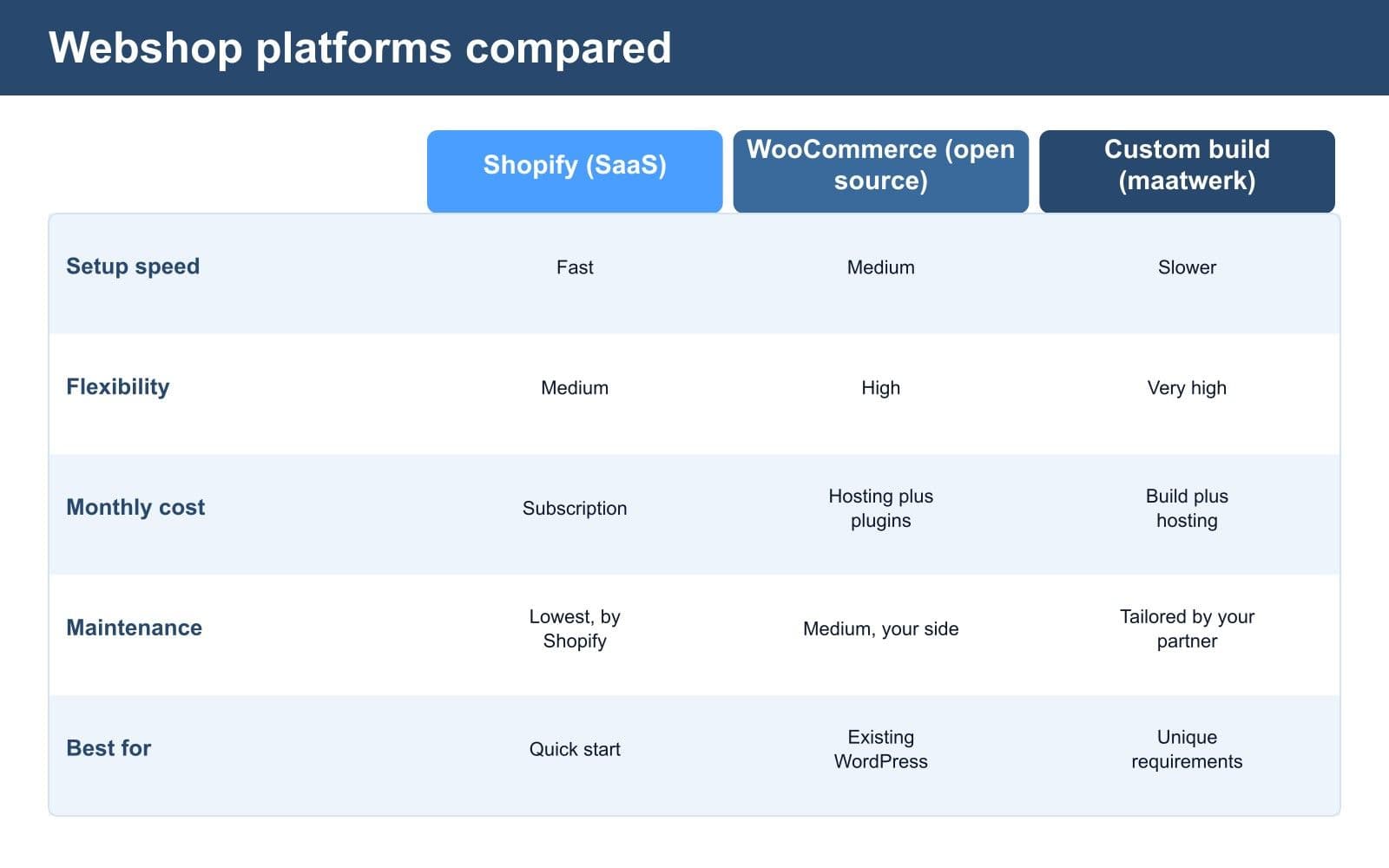
- Off-the-shelf platforms such as Shopify: live quickly, little technical maintenance, fixed monthly costs.
- Open source with WordPress and WooCommerce: more freedom and control, but also more of your own responsibility for maintenance and hosting.
- Custom built: a webshop built entirely around your process, ideal for special requirements or integrations with other systems.
Which one fits depends on your products, your budget and your growth plans. In our article on choosing between WordPress, Shopify or custom we look more deeply at the trade-offs per platform.
A good choice here prevents expensive migrations later. So do not choose on price alone, but on what suits where you want to be in two years.

Step 3: design that sells
A beautiful webshop is not the same as a webshop that sells. The design has to help visitors quickly find what they are looking for and check out without doubt.
When it comes to design, pay attention to:
- a logical layout of categories
- clear product pages with good photos
- a search function that works
- a cart that is always visible
- a checkout process with as few steps as possible
- a design that works well on mobile
That last point is no detail. Most people visit a webshop on their phone. If checkout does not run smoothly there, customers drop off at the most important moment.
The design also has to match your brand. Trust starts with a tidy appearance. A messy shop costs you sales, however good your products are.
Step 4: filling in products and content
The technology is half the work. The other half is the content: your products, texts and photos. This is often the part business owners underestimate.
For every product you need:
- a clear title
- an honest, selling description
- good photos from several angles
- the right price and any variants (size, colour)
- stock information
- shipping details such as weight or size
In addition there are fixed pages: about us, contact, shipping and returns, and the terms and conditions. These pages seem like a side issue, but they build trust and are partly legally required.
Good product texts also help your visibility in Google. Write for your customer, not for the search engine, but do include the words people search for.
Step 5: setting up payment methods and shipping
A webshop without smooth payment sells nothing. In the Netherlands iDEAL is the most important payment method. In addition, customers expect options such as credit card, pay later or a digital wallet.
Payments usually run through a payment service, also called a payment provider. It connects iDEAL and other methods to your shop in one go. Which one you choose and what it costs differs per provider.
Besides paying, you also arrange shipping:
- which carriers you work with
- what the shipping costs are
- from which amount you ship for free
- whether customers can collect in person
- how you handle returns
These choices help determine your margin. Calculate them carefully, because shipping costs that are too low or returns that are too generous can eat into your profit.
Step 6: testing before you go live
Before the launch you test the whole shop as if you were a customer yourself. This prevents painful mistakes the moment real money comes in.
In any case, check:
- adding a product to the cart and checking out
- a real test payment with iDEAL
- the confirmation email the customer receives
- how it works on phone, tablet and computer
- the speed of the pages
- whether stock is deducted correctly
- whether taxes and shipping costs are right
Also let someone else take a look. You know your shop, but a fresh pair of eyes sees what is illogical. A smooth test phase means a calm launch.
Step 7: going live and getting your first customers
Going live is a milestone, but not the finish line. A webshop nobody knows about sells nothing. From day one you work on awareness.
Ways to reach your first customers:
- informing your existing network and customers
- setting up and connecting your Google Business Profile
- attention through social media
- email to existing contacts
- targeted ads if the budget allows
- working on your visibility in Google
Do not expect a flood of orders right away. The first weeks are mainly about learning: what works, where people drop off, which products do well. Use those insights to improve.
What does having a webshop built cost?
This is often the first question, and the answer is: it depends on what you need. Still, we are happy to give an indication so you get a feel for the ranges.
As a guideline (indicative, not a fixed price):
- a simple webshop on a standard platform: from a few thousand euros
- a professional small-business webshop with custom styling: roughly four to ten thousand euros
- fully custom with integrations: ten thousand euros and up
On top of that come ongoing costs: hosting or a platform subscription, payment fees per transaction, and maintenance. Count on a monthly amount to keep your shop running and secure.
The exact investment depends on your situation. Request a no-obligation quote so you get a price tailored to you instead of a guess.
What determines the lead time of your webshop?
The lead time varies a lot per project. A simple shop on an existing platform can be live within a few weeks. An extensive or custom webshop quickly takes several months.
What mainly determines the lead time:
- how many products have to be entered
- whether texts and photos are already ready
- how much custom work and how many integrations are needed
- how quickly you give feedback and supply content
Business owners often underestimate that last point. The build rarely stalls at the agency, but it does stall when supplying products and photos. So start with that early, even if the shop is not finished yet.
The role of a fixed partner after the launch
A webshop is never finished. Products change, software gets updates and customers expect everything to keep working. That is why it is wise to think about who maintains your shop.
Good maintenance means:
- updates of the platform and plug-ins
- protection against misuse
- backups for when something goes wrong
- speed checks
- small adjustments and new products
You can do this yourself if you have the time and knowledge. Many business owners deliberately choose to outsource it, so they can focus on selling. At ITComSol you can have a webshop built and then managed, so technology never becomes your worry.
Common mistakes with a first webshop
Learning from other people's mistakes is cheaper than making them yourself. These are the pitfalls we see most often:
- starting without a clear goal or audience
- choosing the platform on price instead of growth potential
- poor or too few product photos
- a checkout process that is too long or confusing
- no mobile test before the launch
- forgetting the legal pages and terms
- thinking customers will come by themselves after going live
The good webshops in our region, from custom-built webshops to local business owners who have a webshop built in Groningen, share one thing: they think things through in advance. The most expensive shop does not win, the best thought-out one does.
Want to have a webshop built that really sells? We think along with you about platform, design, payments and growth, tailored to your products and budget. That way you go live with a shop that works and grows with your business. See what we can do for your webshop or request a no-obligation quote.
Frequently asked questions
How do I have a webshop built, step by step?
You start with your goal and products, then choose a platform, have the design and technology built, fill in your products and content, set up payments and shipping, test everything and then go live. After the launch you work on awareness and growth.
What does having a webshop built cost?
That varies per project. Indicatively, a simple webshop starts at a few thousand euros, a professional small-business webshop sits around four to ten thousand euros, and fully custom costs more. On top of that come ongoing costs for hosting, payments and maintenance. Request a quote for a price tailored to you.
Which platform do I choose for my webshop?
That depends on your products, budget and growth plans. An off-the-shelf platform is live quickly with little maintenance, open source gives more freedom but needs more management, and custom suits special requirements or integrations. Choose based on where you want to be in a few years, not just on price.
How quickly can my webshop be live?
A simple webshop on an existing platform can be live within a few weeks. An extensive or custom webshop quickly takes several months. The lead time mainly depends on the number of products, the amount of custom work and how quickly you supply content and feedback.
What do I need before I start?
Useful to have ready in advance: a clear overview of your products with prices, good photos, product texts, your business details and a registration with the chamber of commerce. The more you prepare in advance, the smoother the build goes.
What are the monthly costs of a webshop?
Count on costs for hosting or a platform subscription, transaction fees per payment, and maintenance to keep your shop secure and up to date. The amount depends on your platform and size. A maintenance plan ensures technology never becomes your problem.